A client file leaked
Which programs read that folder in the last month, and on whose laptop?
File-access history · Mac · Windows · Linux
Tracewell records which program opened which folder on every computer you run, and lets you answer who read this?
in seconds, weeks after it happened.
Each ripple is one file open. Move your pointer to make your own.
01 The question
Something happened to your files. What touched them, when, and on which machine?
A client file leaked
Which programs read that folder in the last month, and on whose laptop?
Someone is leaving
Any unusual reading of shared or confidential folders before the last day?
A new AI tool is installed
What did it actually read? Only the project, or the whole Documents folder?
The operating system sees every file open for a split second. Then the history is gone. Security tools watch for malware, not for who read your contracts. So after an incident, most companies are left with guesses.
02 How it works
A small collector on each computer. A compressed history in the region you choose. An answer in your browser.
1 / 4
The collector reads the operating system's own file-event feed: Apple Endpoint Security on Mac, ETW on Windows, fanotify on Linux. It observes only. It can't block, change or delay a file.
2 / 4
Repeated opens become one row per program × folder every ten minutes, then compressed. A noise filter can drop operating-system housekeeping before anything leaves the machine.
3 / 4
Encrypted, to storage isolated per company, in the EU or the US. Each machine has its own identity. A machine that is offline keeps recording and catches up later.
4 / 4
Open the console and ask. Search by folder, program or process. See which programs are behind the reads, and which of them are new this week.
03 Try it
This is how the search works in the console. Pick a question.
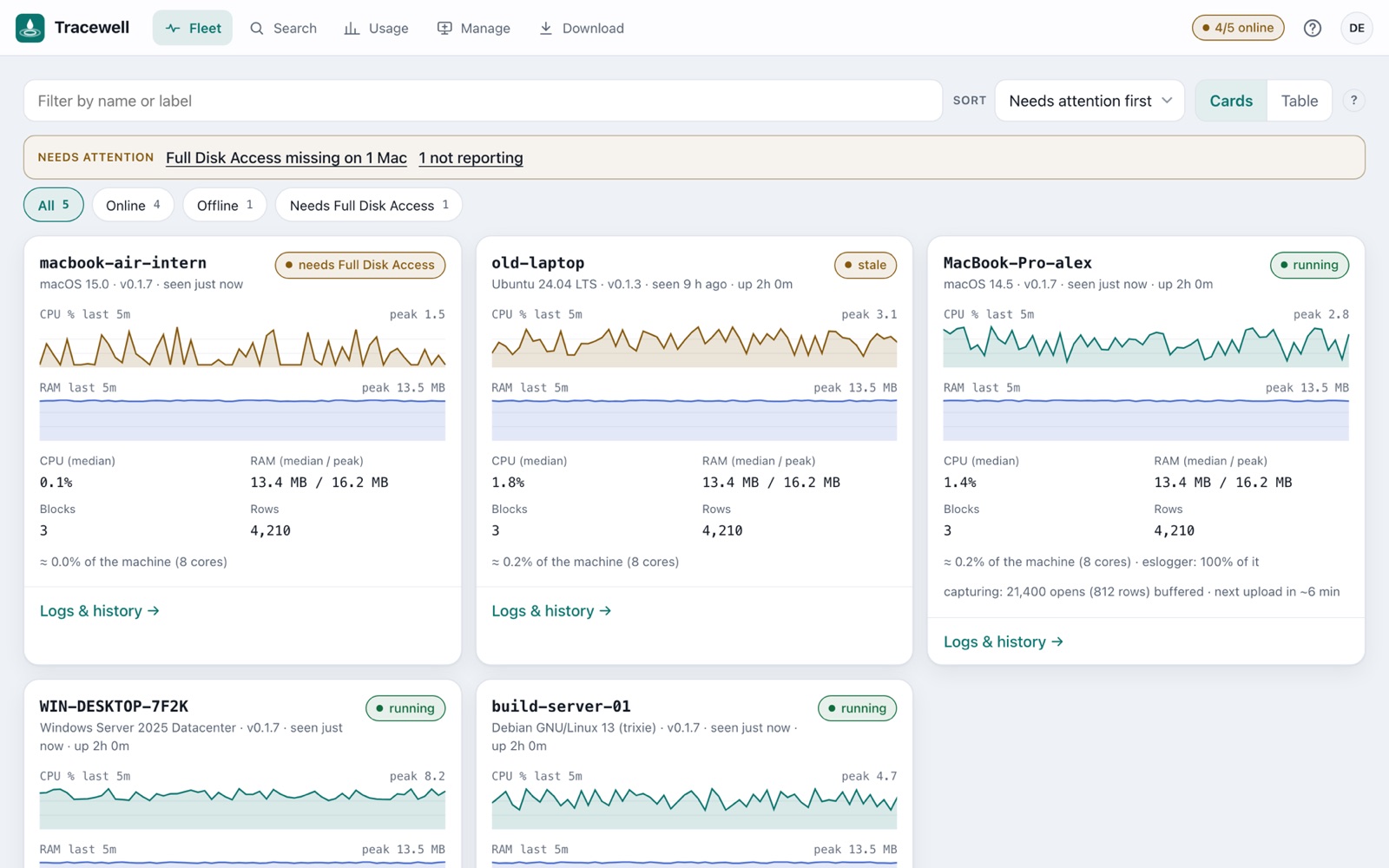
04 The console
05 The cost
99.75%
smaller. 38.9 million file opens over three days on a developer's Mac: 6.5 GB of raw events, stored as 16 MB.
← 16 MB stored. Drawn to scale.
<3%
of one CPU core, median, on a busy developer Mac. About 0.3% of an 8-core machine.
~25 MB
of memory for the collector.
~5 MB
stored per busy machine per day. About 150 MB a month.
5 min
from an enrollment token to the first machine on your dashboard.
The cost is never hidden: the console shows every machine's CPU and memory use of the collector, live.
06 Privacy
Built to be acceptable to the people whose computers it runs on, and to the auditors who ask about it.
/Users/alex/Documents/contracts/acme-2026.docx
Isolated
Each organization's data is separate, in the EU or the US. The two regions are separate services with nothing shared.
By invitation
Colleagues join as viewer, admin or owner. Every admin action is logged: who, what, when.
No keys on machines
A machine enrolls with a one-time token and gets its own identity. Deactivate any machine in about a minute.
Observe-only
It can't block, change or delay a file. A signed and notarized Mac app; releases with checksums.
Monitoring employees' devices must be disclosed to them and needs a legal basis (GDPR and local labour law). We give you a notice template for the pilot.
07 What it's for
Ransomware, a leaked file or a stolen laptop: which programs read which folders, on which machines, before and after.
See what an AI assistant or a coding agent actually read on a machine, before you allow it company-wide.
Check for unusual reading of shared or confidential folders in the last weeks, with a documented process.
A tool that never touched Documents starts reading it: an email the same hour, not a surprise months later.
Show file-access monitoring for ISO 27001, NIS2, TISAX and client security questionnaires.
One health view for Mac, Windows and Linux. Spot machines that are silent, outdated or misconfigured.
08 Where it fits
Your EDR stops malware. Tracewell keeps the file-access history you need when something happens anyway.
| Tracewell | EDR / antivirus | DLP suites | Employee monitoring | File-server auditing | |
|---|---|---|---|---|---|
| Main question | Who read which files? | Is this malware? | Is data leaving? | What are people doing? | Who changed the share? |
| Laptops and local files | Yes | Yes | Yes | Yes | No |
| Searchable file-read history | Weeks to months | Days, limited | Policy hits only | Varies | Servers only |
| Invasiveness | Low: folders only | Low | Medium | High: screens, keys | Low |
| Rollout | Minutes | Days | Weeks to months | Days | Days |
| Blocks threats | No, observe-only | Yes | Yes | No | No |
09 Where it runs
Your organization's history is stored and processed in the European Union. Accounts, machines and data never leave the region.
10 Pricing
You pay for the machines that reported in a month. No minimum, no setup fee. Indicative prices for the pilot phase, excluding VAT.
per month
€300
Pilot
Free
30 days, up to 25 machines. We install together and review the findings with you every week.
Starter
€3 per machine / month
Fleet, Search, Insights, email alerts, noise filter. 90 days of history. No minimum: one machine is fine.
Business
€6 per machine / month
Everything in Starter, plus one year of history, alerts on chosen folders, audit-log export and priority support.
Enterprise / MSP
Custom
Volume pricing, single sign-on, SIEM export, your own storage, a service-level agreement.
11 The pilot
Pick 5 to 25 computers. We install together in 30 minutes.
Day 1
Generate a token and install: one command, or the Mac app. Machines appear on Fleet within minutes.
Week 1
We look at what is normal on your machines, turn on the noise filter and the email alerts.
Weeks 2–3
Real questions: a sensitive folder, an AI tool, a new hire's laptop. Alerts start to mean something.
Week 4
Review: questions answered, alerts that mattered, cost on the machines. You decide what's next.
We agree upfront what success means
At least one real question answered, alerts you would keep, and no slowdown your users notice.
12 Questions
No contents, no screens, no keystrokes: only which program read which folder. It has to be disclosed to staff, and we give you a notice template. It protects employees too: it shows what a tool did, not just who sat at the machine.
Under 3% of one CPU core on a busy Mac (median) and about 25 MB of memory. You don't have to take our word for it: the console shows the collector's cost on every machine.
Keep it. An EDR stops malware. Tracewell keeps the file-access history you need when something happens anyway, for weeks or months instead of days.
In Google Cloud, in the region you choose: the EU or the US. The two are separate services with nothing shared. Data is isolated per organization and encrypted in transit and at rest.
During a pilot, for the whole pilot. On a plan, 90 days or one year; longer on request.
Admin rights, once per machine. On a Mac: the app and one Full Disk Access grant, which the app walks you through. On Windows and Linux: one command with your token. You can remove it at any time.
It keeps recording and uploads when it is back.
It doesn't block anything, it doesn't read file contents, and it doesn't watch the network or email. Search runs per machine and day today; search across all machines at once is planned. Sign-in is with a Google account or an email address and password.
A free 30-day pilot on 5 to 25 of your computers. Setup takes 30 minutes.